
IXC Billing WebV7 — what’s new for operators (vs legacy v6 UI)
PRODUCT UPDATE
June 2026 — IXC Software Distribution Corp.
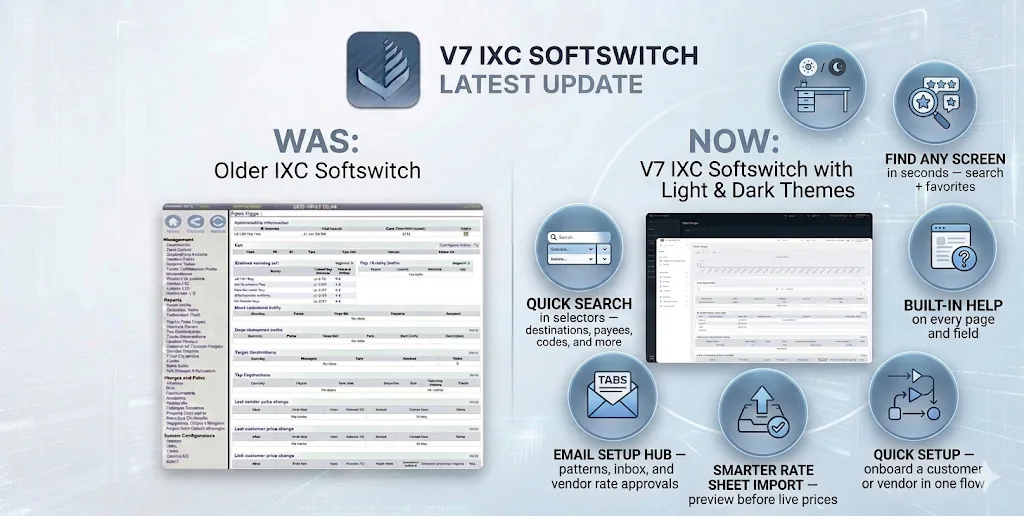
IXC Billing WebV7 is the next-generation IXC billing and switch management interface. Same billing database, same permissions model — but a cleaner, faster, more guided experience than the legacy v6 billing UI.
We also added quick search on every major selector — destinations, payees, codes, originators, and terminators — so you can find the right row without scrolling long dropdowns.
1. A modern workspace you can work in all day
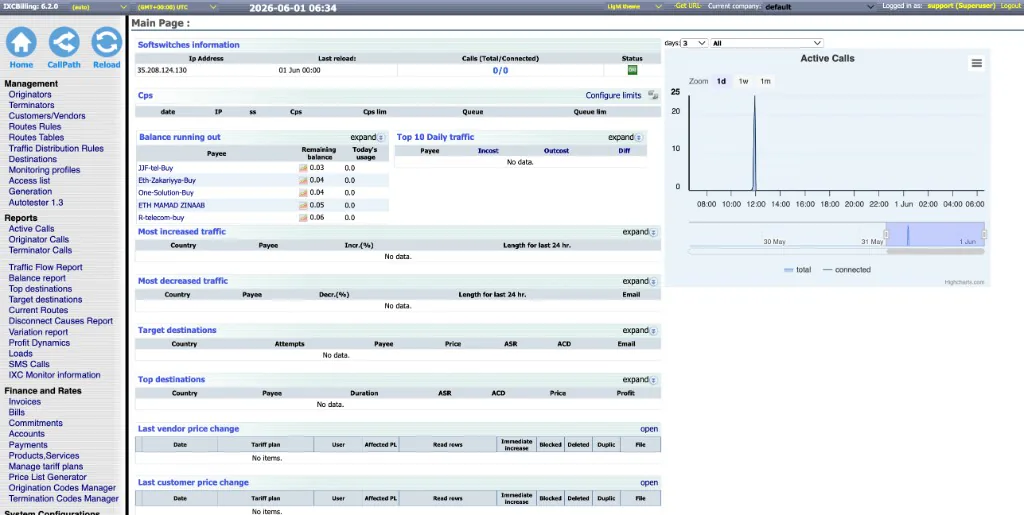
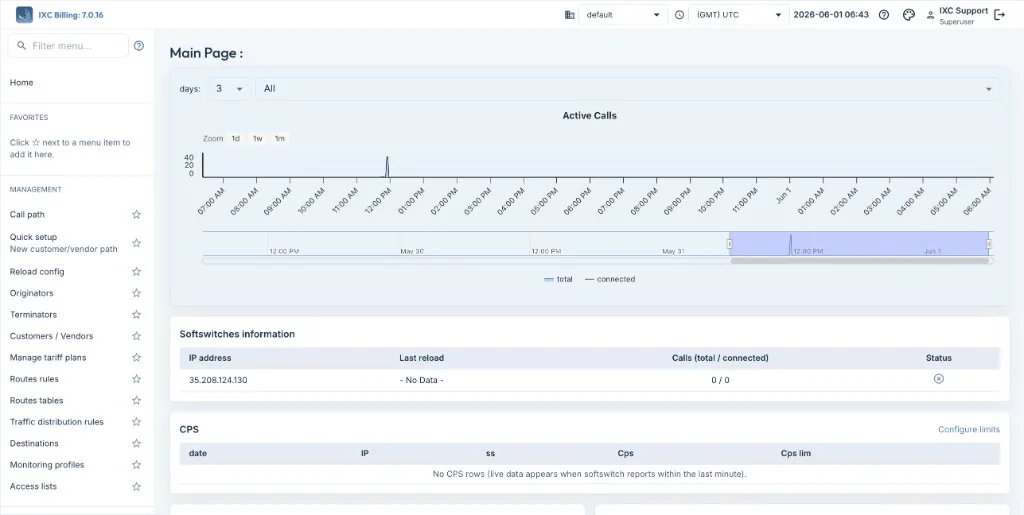
What changed: The legacy v6 UI uses dense tables, nested sidebar sections, and a separate “Show advanced menu” toggle in the top bar. WebV7 opens on a spacious dashboard with a persistent left sidebar, clear section labels (Management, Reports, Finance, System, Troubleshooting), and content that scales on wide monitors without feeling cramped.
2. Find any screen in seconds — search + favorites
What changed: In v6 you scroll long sidebar lists or flip “advanced menu” on/off. WebV7 adds menu search at the top of the sidebar (type a screen name, jump straight there) and ★ Favorites — pin the screens you use daily (Active Calls, Tariff Plans, Reload config, and more) to the top. No cookie tricks, no hidden menus.
3. Built-in help on every page and field
What changed: The legacy UI relies on external manuals and tribal knowledge. WebV7 puts contextual help (?) on page titles, table columns, form fields, tabs, and action buttons. Toggle help on/off from the header. New operators can learn while configuring originators, routes, or CDR templates — without leaving the screen.
4. Light, dark, and auto theme
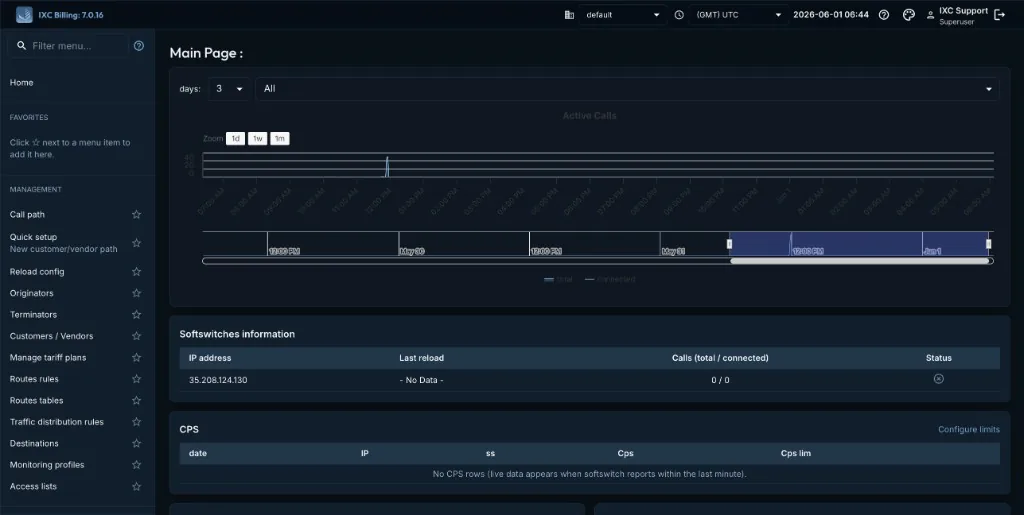
What changed: The legacy v6 UI offered a light/dark toggle but not a cohesive theme system. WebV7 lets each user pick Light, Dark, or Auto (follow OS) from the top bar — a consistent look across every screen, including night shifts in the NOC.
5. Quick Setup — onboard a customer or vendor in one flow
What changed: The legacy UI has no equivalent on the main menu. WebV7 adds Quick setup — a step-by-step wizard (payee → originator/terminator → routing → prices → reload → optional call-path test) that walks you through standing up a working route without jumping across ten different screens.
6. Smarter rate sheet import — preview before live prices
What changed: Legacy rate uploads often feel like “upload and hope.” WebV7 Smart upload on customer/vendor tariff plans gives a multi-step flow: pick file → map columns if headers differ → preview row counts and warnings → confirm import. You see activation notices and parse issues before prices hit the switch.
7. Customer rate emails — send, pool, and confirm from the tariff plan
What changed: Legacy rate mail is fragmented across tariff UI, manual email, and limited tracking. On a customer tariff plan, WebV7 shows a Customer rate email panel per payee: mail-ready status, pending pool on the switch, Send updates, Apply pool now, confirm-mode flags, and clear blockers (“set payee Email”, “enable rates mailbox”). Operators see what will happen before the customer gets the sheet.
8. Email Setup hub — patterns, inbox, and vendor rate approvals
What changed: The legacy UI scatters mail under System → Mailing and older server config. WebV7 System → Email setup is a tabbed hub: general accounts, mail patterns, message inbox, rate approvals (vendor sheet queue), and parse templates — with company scope and permissions per tab. Approve vendor imports without hunting through hidden screens.
9. Important system tools back on the main menu
What changed: In v6, items like CDR templates, Manage currencies, and Manage interfaces are often commented out of the sidebar — reachable only if you know the URL. WebV7 lists them openly under System, alongside codec profiles, signalling profiles, translate rules, and black lists — the screens operators need after go-live.
10. Roles & permissions — grouped, searchable, auditable
What changed: Legacy role editing is a long flat checkbox list. WebV7 Roles / permissions uses module accordions (Originators, Routing, Reports, …) with filter, per-module select-all, and (?) help on each permission. The Permission Report is a matrix: roles across the top, permissions down the side — edit multiple roles in one view and save once.
11. Dashboard & reports — clearer monitors, less clutter
What changed: The v6 main page packs many HTML tables and legacy graph embeds. WebV7 Main page keeps familiar widgets (softswitch status, CPS, balance alerts, traffic deltas, price changes) in card layouts with role-gated visibility, plus an active calls chart that loads cleanly. Reports use consistent filters, pagination, and the same help pattern as the rest of WebV7.
12. Mobile-friendly navigation for on-call checks
What changed: The v6 sidebar is desktop-first. WebV7 collapses to a hamburger menu on smaller widths — open Active Calls or Reload config from a tablet without horizontal scrolling through legacy tables.
13. Quick search in selectors — destinations, payees, codes, and more
What changed: Long dropdowns for destinations, payees, codes, originators, and terminators are painful on busy screens. WebV7 adds quick search inside each selector — type a few characters, filter the list instantly, pick the right row. Same billing data; less hunting on route rules, tariff plans, and reports.
Availability
IXC Billing WebV7 is rolling out to existing IXC Softswitch deployments. Ask your account team or noc@ixc.ua for upgrade planning and training.
About IXC Software Distribution Corp. (™ IXC Softswitch)
IXC delivers carrier-style VoIP infrastructure proven in production since 1999. Office: 7950 NW 53rd Street, Suite 337, Miami, Florida 33166. Media: alex@ixc.ua