
Rate Deck Management for Wholesale VoIP: Import, Effective Dates & Increases
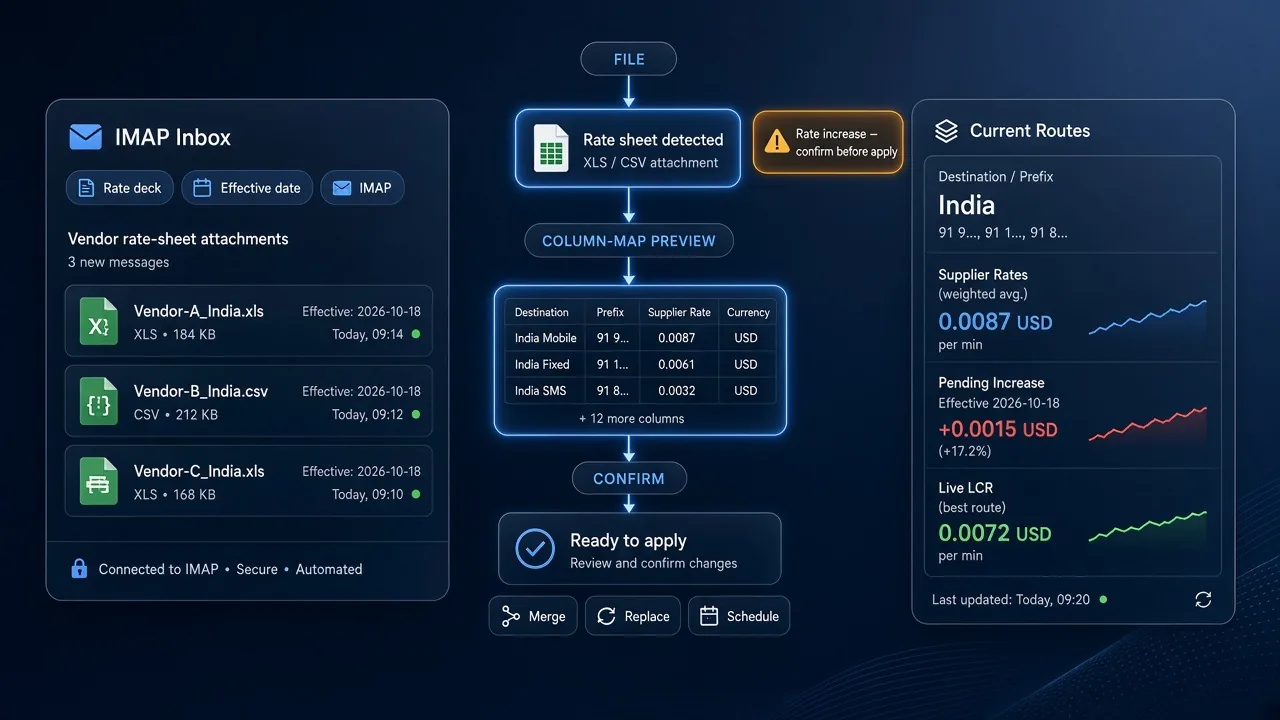
A rate deck (rate sheet) is the buy or sell price list by prefix that LCR and billing both depend on. Wholesale margin dies when a vendor increase lands in email and sits unapplied — or applies live without anyone confirming it.
This is not how CDRs get rated. This is how prices get onto the switch before the next call. On IXC Softswitch that means IMAP ingest, previewed imports, effective dates, and Telegram confirmation on increases.
What a wholesale rate deck is
Every interconnect has two lists:
- Vendor (terminator) rates — your cost
- Customer (originator) rates — what you sell
Each row is a prefix (or code), a price, a billing increment (6+6, 1+1), a currency, and an effective date. The industry still ships these as XLS/CSV in email. The switch has to turn that file into live LCR without breaking today's traffic.
Why stale decks kill LCR
Least cost routing ranks vendors by the rates it currently holds. If those rates are yesterday's:
- You keep sending to a vendor who already raised the price — negative margin until the invoice
- You leave a cheaper vendor unused because their new sheet never landed
- Customer sell rates stay cheap while your cost moved — you fill volume and lose money
Quality floors (ASR/ACD/PDD) cannot save a deck that is wrong.
The ingest problem
A trading desk does not update "a rate". It handles many vendors, many files, many dates:
- Attachments with different column names and prefix formats
- Weekend or midnight increases that must not go live blindly
- Partial updates (only India Mobile) vs a full A–Z replace
- A sheet dated tomorrow that must not overwrite today's live LCR
- The same destination on customer plans that still need a matching sell update
Manual copy-paste into billing is how silent losses start.
IXC rate-deck workflow
IMAP auto-upload
Vendors mail sheets to a mailbox the switch watches. Parse templates map columns; the rate-approvals queue shows what arrived before prices hit routing. You are not hunting attachments across ten inboxes.
Smart upload — preview before live prices
When a file is uploaded (or pulled from mail), Smart upload is pick file → map columns if headers differ → preview row counts and warnings → confirm. Activation notices and parse issues show before the deck is live.
Import modes
Choose the mode that matches the email, not a default "overwrite everything":
- Merge (partial) — update only codes in the file; leave the rest of the live deck
- Replace full deck — rebuild live (and scheduled) sheets from today's file
- Schedule full deck — future activation; do not touch today's live rates
- New plan wipe — empty a plan and start clean
Wrong mode is how you delete 8,000 codes you meant to keep.
Effective dates
A sheet with tomorrow's date must sit as a scheduled deck until it activates. Live LCR keeps using today. Cumulative future lists stack; you can see what will change before it does.
Rate increases — confirm before you eat them
A cost increase is not a merge you apply on autopilot. IXC flags increases and asks for Telegram confirmation before they become the new LCR input. Decreases can flow faster; increases need a human yes — or a matching sell-rate move.
Current Routes before you set sell
Current Routes shows, for a destination: suppliers, rates, volumes, quality, and pending increases. Set customer sell rates from that view, not from the last spreadsheet on the desktop.
Customer rate emails
Outbound is the other half: mail-ready status, pending pool on the switch, send updates, apply pool, confirm-mode flags. The customer gets the sheet you actually loaded — not a file that drifted from billing.
Common mistakes
- Applying a vendor increase without checking quality or moving sell rates
- Using replace when the vendor sent a partial file
- Ignoring effective date so a future deck overwrites live LCR at noon
- Duplicate codes and wrong prefix length (systematic under-billing — see VoIP billing)
- Letting IMAP import run with no approval queue
Summary
Wholesale rate decks are the input to LCR and billing. Import from IMAP, preview with Smart upload, pick merge vs replace vs scheduled, and confirm increases in Telegram before they hit routing. Then check Current Routes and push customer sheets from the same plan.
See IXC Softswitch or talk to sales.
Frequently asked questions
What is a VoIP rate deck?
A prefix-level buy or sell price list with increments, currency, and an effective date. Vendor decks are your cost; customer decks are what you charge. LCR and billing both read these lists.
Is rate-deck management the same as VoIP billing?
No. Billing rates CDRs after the call. Rate-deck management is how those prices get onto the switch beforehand — ingest, preview, effective dates, and increase control.
What is the difference between merge and replace on import?
Merge updates only the codes in the file and leaves the rest of the live deck. Replace rebuilds the whole deck from the file. Use schedule-full-deck when the sheet must activate later without touching today.
How should vendor rate increases be applied?
Not on autopilot. Flag the increase, confirm (IXC uses Telegram), check quality and Current Routes, then move customer sell rates if the spread would go negative.
Can vendor sheets arrive by email?
Yes. IXC watches an IMAP mailbox, parses with templates, and queues rate approvals so attachments become decks without copy-paste — after preview, not instead of it.