
IXC Recording on Softswitch & Billing 7 — the foundation for AI call analysis
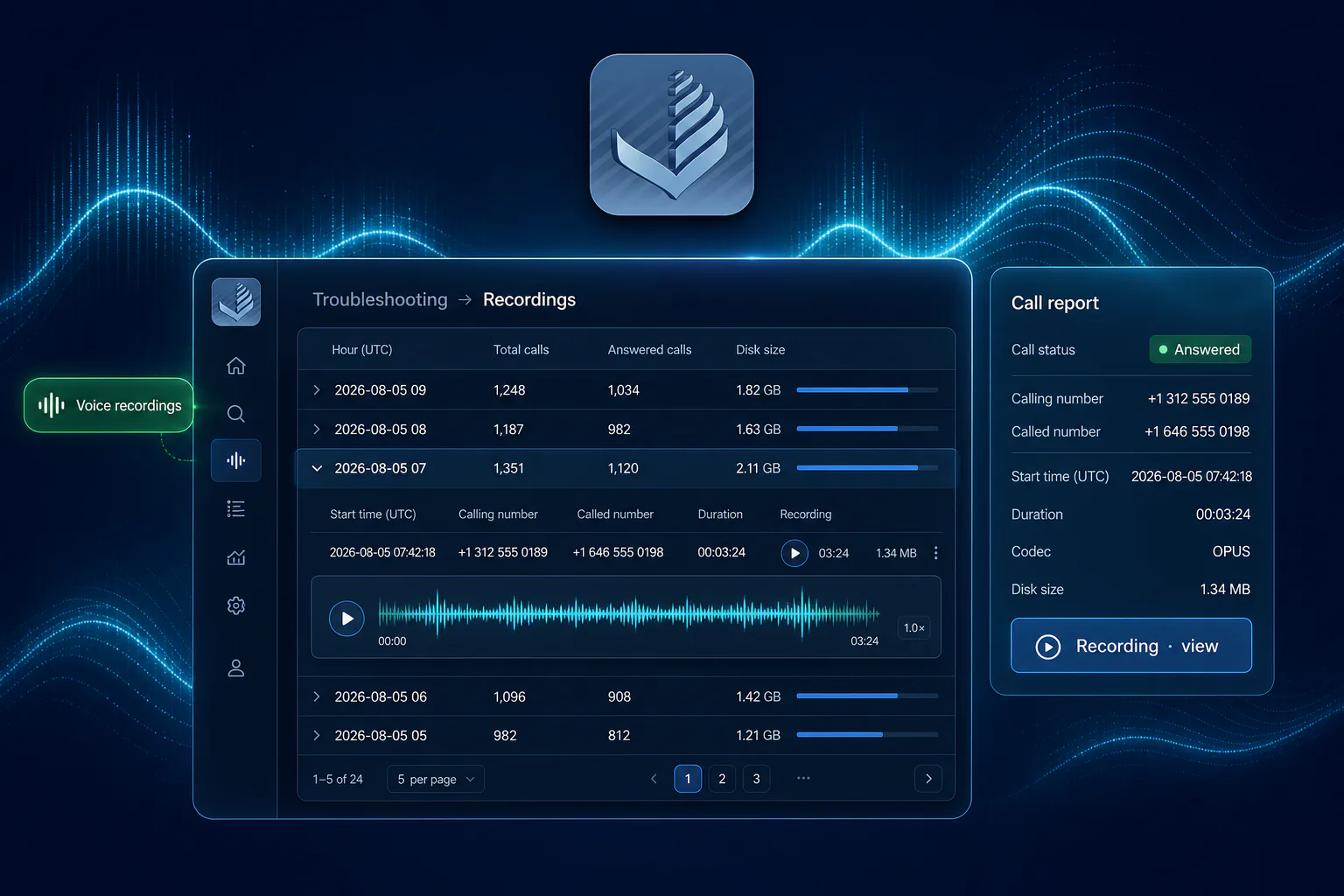
IXC Recording is a stack feature on IXC Softswitch and IXC Billing 7. The softswitch captures call media when recording is enabled; Billing 7 organises that archive so your team — and the next wave of IXC analysis — can work from the same audio.
This overview covers what Recording unlocks, what operators get today, and how it feeds AI call analysis, FAS, and voicemail detection. Product announcement: IXC Recording news.
What problem does it solve?
Carriers already have CDRs, routes, and signalling traces. They did not have structured call audio on the platform — the layer machines and people need for traffic insight, fraud hearing, and call-centre coaching.
Without Recording:
- Audio lives as raw files on the server, not as a first-class platform capability
- There is nothing reliable to mark and send for IXC call analysis
- FAS and voicemail detectors have no media path to listen to
- High-volume networks drown in unmanaged files instead of a searchable archive
IXC Recording closes that gap: softswitch capture plus Billing 7 archive — the foundation for everything that hears the call.
What’s new for operators
1. Recordings page (Troubleshooting)
A new Troubleshooting → Recordings screen shows how much disk is used and lists hour buckets — groupings by time (for example 2026-08-05 09) with:
- how many calls are in that hour
- total size
- when the newest and oldest recording in that bucket were made
Open a bucket to see individual calls. No more scrolling through endless flat lists.
2. Search across all recordings
Need one call but don’t know the hour? Use Search all buckets:
- partial Call-ID
- partial voice tag (route / digits label on the file)
- recorded date range
Results show which hour bucket each match belongs to, so you can drill in or act from the list.
3. Listen, export, clean up
Open a recording to hear it, download audio for a partner or compliance pack, and remove what you no longer need — one call or a batch. Same files you later mark for IXC analysis reports.
4. Retention rules
Optional retention policy on the same page:
- delete recordings older than X days
- keep only the N most recent calls
- trim automatically when disk usage passes a limit
Rules can be saved and run on demand — so the archive stays ready for analysis, not buried in unmanaged media.
5. From call reports — without leaving your workflow
On Originator Calls and Terminator Calls, when recording is active, open the recording from the call row — the same habit as opening a SIP trace. Listen or export without hunting the Troubleshooting menu.
Before vs with V7 Recordings
Before
- Files scattered by hour on the server
- Hard to find one Call-ID among thousands
- Jump between reports and server paths
- Manual cleanup
- No clean path to AI analysis or FAS/voicemail hearing
With V7 Recordings
- Clear hour buckets and pagination
- Search by Call-ID, tag, or date
- Open from Originator / Terminator reports
- Retention rules built into the UI
- Mark → analyse → automatic report pipeline can start
Who is it for?
- Platform owners building the next layer — AI traffic analysis, FAS, voicemail detection
- Call centres & wholesale that will mark calls and get IXC analysis reports back
- Quality / compliance — locate and export specific conversations when needed
- Operations — monitor disk use and apply retention before storage fills up
Access follows your usual roles and permissions.
What you need to use it
IXC Recording spans both layers:
- Softswitch — recording enabled for your platform (install/build) and on the originator signalling profile for the traffic you want captured
- Billing 7 — Recordings UI, report deep-links, export, and retention for what exists on disk
Why it matters — and what’s next
Recording is not the end product. It is the first step toward IXC call analysis — mark calls, get the report back automatically — and toward real-time FAS and voicemail detection on the same media path.
Availability
IXC Recording requires a softswitch build with voice recording enabled, plus IXC Billing 7.0.90 or later for the operator UI. See the product announcement or contact noc@ixc.ua.
Summary
Softswitch capture plus Billing 7 archive: hour buckets, search, listen/export, retention, and report deep-links — the foundation for IXC analysis and detection, not a side tool for tickets.
Frequently asked questions
What problem does IXC Recording solve?
It puts structured call audio on the platform — softswitch capture plus a Billing 7 archive — so IXC can run call analysis, FAS and voicemail detection on real media, not only CDRs.
Where do I find recordings in IXC Billing 7?
Open Troubleshooting → Recordings for hour buckets and search, or open a recording from Originator Calls and Terminator Calls when recording is active.
How does this lead to call analysis?
You mark calls in IXC from the organised archive, send them for analysis, and receive an automatic report back in IXC — emotion, agents, transcripts.
What do I need to use IXC Recording?
A softswitch build with voice recording enabled (platform plus originator signalling profile), and IXC Billing 7.0.90 or later for the Recordings UI.